





猜数字游戏(Java实训)
实训目的:
掌握 Java GUI 编程和随机函数的使用。
实训要求:
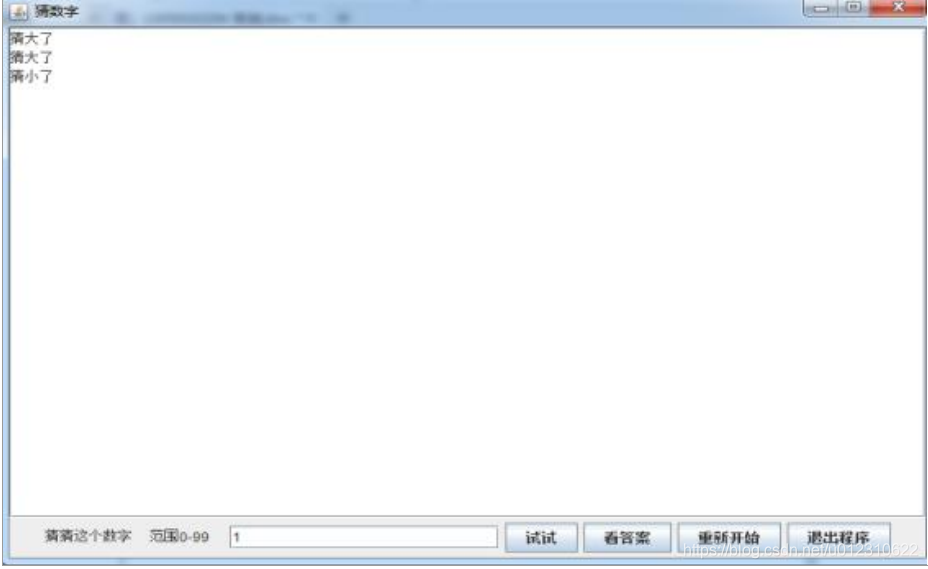
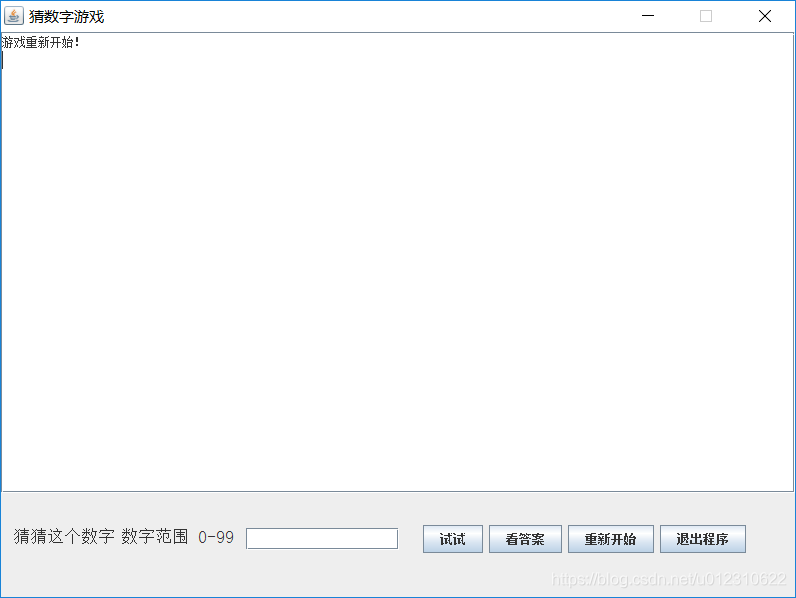
每次产生一个 0-99 之间的随机数,用户输入猜测的数字后,
点击“试试”,系统将给出“大了”或“小了”的提示信息,帮助用户直到
猜对结果为止。实现效果如上图。
运用GUI设计即可。
Test.java
package program7

import java.awt.EventQueue

import javax.swing.JFrame
import javax.swing.JTextArea
import javax.swing.GroupLayout
import javax.swing.GroupLayout.Alignment
import javax.swing.JLabel
import javax.swing.LayoutStyle.ComponentPlacement
import java.awt.Font
import javax.swing.JTextField
import javax.swing.JButton
import java.awt.event.ActionListener
import java.util.Random
import java.awt.event.ActionEvent
import javax.swing.JScrollPane

public class Test {

	Random R = new Random()
	int temp = R.nextInt(100)
	private JFrame frame
	private JTextField textField

	public static void main(String[] args) {
		EventQueue.invokeLater(new Runnable() {
			public void run() {
				try {
					Test window = new Test()
					window.frame.setVisible(true)
				} catch (Exception e) {
					e.printStackTrace()
				}
			}
		})
	}

	public Test() {
		initialize()
	}

	private void initialize() {
		frame = new JFrame()
		frame.setTitle("u731Cu6570u5B57u6E38u620F")
		frame.setBounds(100, 100, 800, 600)
		frame.setResizable(false)
		frame.setDefaultCloseOperation(JFrame.EXIT_ON_CLOSE)
		JTextArea textArea = new JTextArea()
		JScrollPane scrollPane = new JScrollPane()
		scrollPane.setViewportView(textArea)

		JLabel lblNewLabel = new JLabel("猜猜这个数字")
		lblNewLabel.setFont(new Font("宋体", Font.PLAIN, 17))

		JLabel lblNewLabel_1 = new JLabel("u6570u5B57u8303u56F4 0-99")
		lblNewLabel_1.setFont(new Font("宋体", Font.PLAIN, 17))

		textField = new JTextField()
		textField.setColumns(10)

		JButton button = new JButton("u8BD5u8BD5")
		textArea.append("游戏开始!n")
		button.addActionListener(e -> {
			String content = textField.getText()
			if ((content != null) && (!content.trim().equals(""))) {
				int j = Integer.valueOf(content)
				if (j <= 99) {
					if (j > temp) {
						textArea.append("数字 " + content + " 猜大了n")
					}
					if (j < temp) {
						textArea.append("数字 " + content + " 猜小了n")
					}
					if (j == temp) {
						textArea.append("恭喜你,猜对了,数字为" + temp + "n")
					}
				} else {
					textArea.append("输入的数字超过范围了,重新输入吧!n")
				}
				textField.setText("")
			} else
				textArea.append("输入不为空,请重新输入!n")
		})

		JButton button_1 = new JButton("u770Bu7B54u6848")
		button_1.addActionListener(e -> {
			textArea.append("答案是" + temp + "n")
		})

		JButton btnNewButton = new JButton("u91CDu65B0u5F00u59CB")
		btnNewButton.addActionListener(e -> {
			textField.setText("")
			textArea.setText("")
			temp = R.nextInt(100)
			textArea.append("游戏重新开始!n")
		})

		JButton button_2 = new JButton("u9000u51FAu7A0Bu5E8F")
		button_2.addActionListener(new ActionListener() {
			public void actionPerformed(ActionEvent e) {
				System.exit(0)
			}
		})

		GroupLayout groupLayout = new GroupLayout(frame.getContentPane())
		frame.getContentPane().setLayout(groupLayout)
		groupLayout.setHorizontalGroup(groupLayout.createParallelGroup(Alignment.LEADING)
				.addGroup(groupLayout.createSequentialGroup().addContainerGap().addComponent(lblNewLabel)
						.addPreferredGap(ComponentPlacement.RELATED).addComponent(lblNewLabel_1)
						.addPreferredGap(ComponentPlacement.RELATED)
						.addComponent(textField, GroupLayout.PREFERRED_SIZE, 153, GroupLayout.PREFERRED_SIZE).addGap(24)
						.addComponent(button).addPreferredGap(ComponentPlacement.RELATED).addComponent(button_1)
						.addPreferredGap(ComponentPlacement.RELATED).addComponent(btnNewButton)
						.addPreferredGap(ComponentPlacement.RELATED).addComponent(button_2)
						.addContainerGap(24, Short.MAX_VALUE))
				.addComponent(scrollPane, GroupLayout.DEFAULT_SIZE, 794, Short.MAX_VALUE))
		groupLayout.setVerticalGroup(groupLayout.createParallelGroup(Alignment.LEADING)
				.addGroup(groupLayout.createSequentialGroup()
						.addComponent(scrollPane, GroupLayout.PREFERRED_SIZE, 461, GroupLayout.PREFERRED_SIZE)
						.addGap(32)
						.addGroup(groupLayout.createParallelGroup(Alignment.BASELINE).addComponent(lblNewLabel)
								.addComponent(lblNewLabel_1)
								.addComponent(textField, GroupLayout.PREFERRED_SIZE, GroupLayout.DEFAULT_SIZE,
										GroupLayout.PREFERRED_SIZE)
								.addComponent(button_2).addComponent(btnNewButton).addComponent(button_1)
								.addComponent(button))
						.addContainerGap(45, Short.MAX_VALUE)))
	}
}
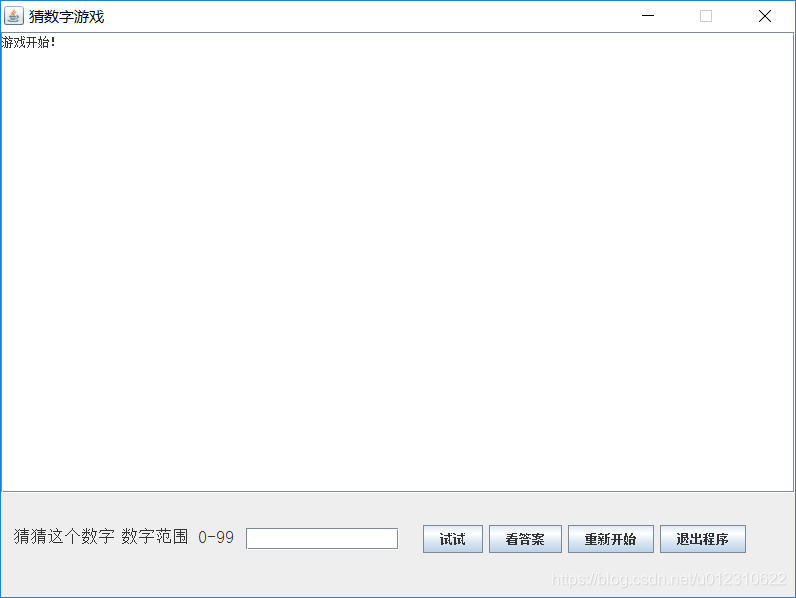
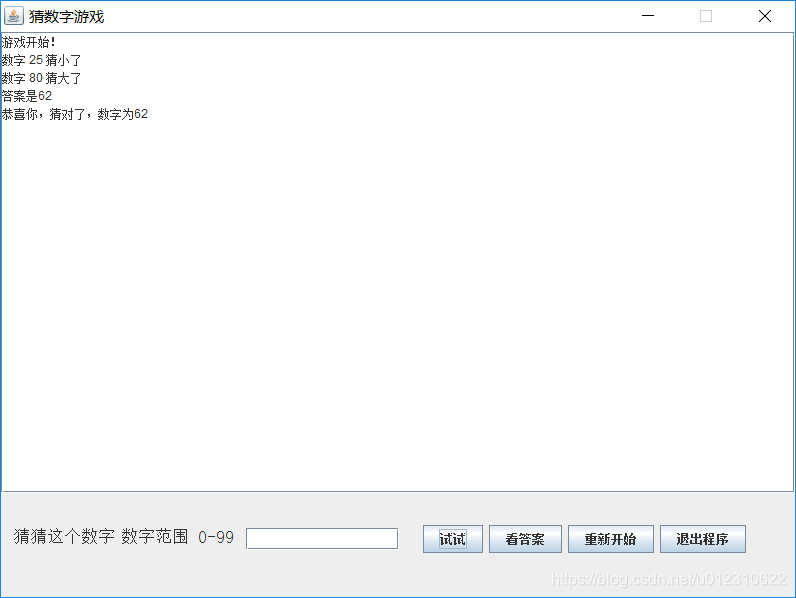
结果展示:

Comments NOTHING