





学生信息管理系统(Java实训)
项目源码下载地址:
https://github.com/Chien-W/Student-management-system-simple-.git特别注意:使用这个系统,需要在本地建立好对应的数据库的表!表的式样在github文件中。并且增删改查使用的是SQL server语句,若你使用的是My SQL,可能需要自己修改一下增删改查中对数据库操作的语句。
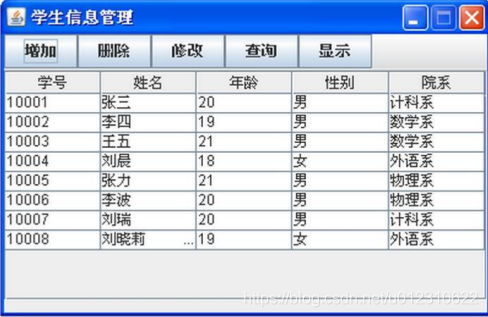
实训目的:
掌握类的定义,对象的使用,集合以及文件读写操作。
实训要求:
(1)要使用 Java 的 GUI 设计出计算器界面。(2)能够保存
学生信息到文本文件,并且能从文件打开。可以用 Vector、ArrayList、
LinkedList 等形式存储,能用 MySQL/SQL Server 等数据库存储则更佳。(3)通过界面按钮实现学生信息的管理,实现学生信息的增加、删除、修改、查询等功能。
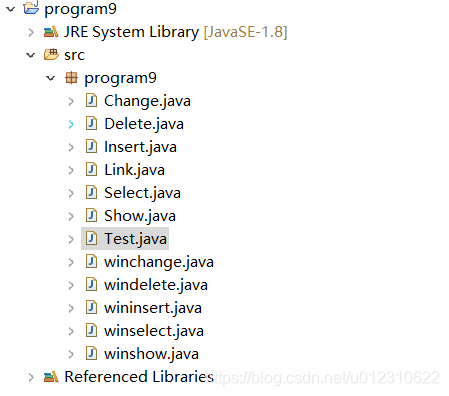
本题代码和类比较多,win开头的文件和test都是window build的类。其他都是普通类。
Change.java
package program9

import java.sql.Connection
import java.sql.DriverManager
import java.sql.PreparedStatement
import java.sql.ResultSet
import java.sql.SQLException

import javax.swing.JOptionPane

public class Change extends winchange {

	public static void change(String S,String Num,String Name,String Age,String Sex,String SelectedIndex) {
	String sql_url = "jdbc:sqlserver://localhost:1433;integratedSecurity=true;DatabaseName=Student"	//数据库路径(一般都是这样写),test是数据库名称
	String name = "sa"		//用户名
	String password = "wu123456"	//密码
	Connection conn
	PreparedStatement preparedStatement = null

	try {
	Class.forName("com.microsoft.sqlserver.jdbc.SQLServerDriver")		//连接驱动
	conn = DriverManager.getConnection(sql_url, name, password)	//连接数据库
	preparedStatement = conn.prepareStatement("update Student set 学号 = '"+Num+"', 姓名 ='"+Name+"', 年龄='"+Age+"',性别='"+Sex+"',院系='"+SelectedIndex+"' where 学号 = '"+S+"'")
	ResultSet result1 = preparedStatement.executeQuery()
	if(result1.wasNull())
		JOptionPane.showMessageDialog(null, "结果集中无记录")
	} catch (ClassNotFoundException e) {
	} catch (SQLException e) {
	}
	}
}
Delete.java
package program9

import java.sql.Connection
import java.sql.DriverManager
import java.sql.PreparedStatement
import java.sql.ResultSet
import java.sql.SQLException

import javax.swing.JOptionPane

public class Delete extends windelete {
	public static void delete(String Num) {
		String sql_url = "jdbc:sqlserver://localhost:1433;integratedSecurity=true;DatabaseName=Student" // 数据库路径(一般都是这样写),test是数据库名称
		String name = "sa" // 用户名
		String password = "wu123456" // 密码
		Connection conn
		PreparedStatement preparedStatement = null

		try {
			Class.forName("com.microsoft.sqlserver.jdbc.SQLServerDriver") // 连接驱动
			conn = DriverManager.getConnection(sql_url, name, password) // 连接数据库
			preparedStatement = conn.prepareStatement("delete from Student where 学号='"+Num+"'")
			ResultSet result1 = preparedStatement.executeQuery()
			if (result1.wasNull())
				JOptionPane.showMessageDialog(null, "结果集中无记录")
		} catch (ClassNotFoundException e) {
		} catch (SQLException e) {
		}
	}
}
Insert.java
package program9

import java.sql.Connection
import java.sql.DriverManager
import java.sql.PreparedStatement
import java.sql.ResultSet
import java.sql.SQLException

import javax.swing.JOptionPane

public class Insert extends wininsert {

	public static void insert(String Num, String Name, String Age, String Sex, String SelectedIndex) {
		String sql_url = "jdbc:sqlserver://localhost:1433;integratedSecurity=true;DatabaseName=Student" // 数据库路径(一般都是这样写),test是数据库名称
		String name = "sa" // 用户名
		String password = "wu123456" // 密码
		Connection conn
		PreparedStatement preparedStatement = null

		try {
			Class.forName("com.microsoft.sqlserver.jdbc.SQLServerDriver") // 连接驱动
			conn = DriverManager.getConnection(sql_url, name, password) // 连接数据库
			preparedStatement = conn.prepareStatement("insert into Student (学号,姓名,年龄,性别,院系) values ('" + Num + "','"
					+ Name + "','" + Age + "','" + Sex + "','" + SelectedIndex + "')")
			ResultSet result1 = preparedStatement.executeQuery()
			if (result1.wasNull())
				JOptionPane.showMessageDialog(null, "结果集中无记录")
		} catch (ClassNotFoundException e) {
		} catch (SQLException e) {
		}
	}
}
Link.java
package program9

import java.sql.Connection
import java.sql.DriverManager
import java.sql.ResultSet
import java.sql.SQLException
import java.sql.Statement

public class Link extends Test {
	Connection connection = null
	public Link() throws SQLException {
		try {
			Class.forName("com.microsoft.sqlserver.jdbc.SQLServerDriver")
		} catch (ClassNotFoundException e1) {
			System.out.println(e1.getMessage())
		}
		// 接下来,DriverManager试图从已注册的JDBC驱动程序集中选择一个适当的驱动程序。
		// sqlserver 数据库 url
		String urlSqlServer = "jdbc:sqlserver://localhost:1433;integratedSecurity=true;DatabaseName=Student"
		// sqlserver 数据库
		@SuppressWarnings("unused")
		Connection connection = null
		try {
			connection = DriverManager.getConnection(urlSqlServer, "sa", "wu123456")
		} catch (SQLException e) {
			System.out.println(e.getMessage())
		}
		System.out.println("sqlserver 数据库驱动加载成功")


	}
	public String insert(String ID) throws SQLException {
		String val1 = null
		Statement stmt = connection.createStatement(ResultSet.TYPE_SCROLL_INSENSITIVE, ResultSet.CONCUR_READ_ONLY)
		ResultSet rsst = stmt.executeQuery("select * from Student where 学号='ID'") // lect后面*表示所有字段,也可以指定具体的字段
		while (rsst.next()) {
			val1 = rsst.getString(1)
			System.out.println(val1)
		}
		rsst.close()
		stmt.close()
		return val1
	}
}
Select.java
package program9

import java.sql.SQLException
import java.sql.Connection
import java.sql.DriverManager
import java.sql.PreparedStatement
import java.sql.ResultSet
import java.sql.ResultSetMetaData
import javax.swing.JOptionPane

public class Select extends winselect {

		static int max=500
		public static String[][] getnumber(String S){
			String sql_url = "jdbc:sqlserver://localhost:1433;integratedSecurity=true;DatabaseName=Student"	//数据库路径(一般都是这样写),test是数据库名称
			String name = "sa"		//用户名
			String password = "wu123456"	//密码
			Connection conn
			PreparedStatement preparedStatement = null

			String[][] rows = null


			try {
				Class.forName("com.microsoft.sqlserver.jdbc.SQLServerDriver")		//连接驱动
				conn = DriverManager.getConnection(sql_url, name, password)	//连接数据库
				preparedStatement = conn.prepareStatement("select * from Student where 学号='"+S+"'")
				ResultSet result1 = preparedStatement.executeQuery()
				if(result1.wasNull())
					JOptionPane.showMessageDialog(null, "结果集中无记录")

				rows = new String[max][5]
				String[] s = null
				s = new String[5]
				ResultSetMetaData rsmd = result1.getMetaData()
				int i=0
				while(result1.next()){
					s=getNextRow(result1,rsmd)
					for(int p=0p<5p++)
					{
						rows[i][p]=s[p].trim()
					//	System.out.println(rows[i][p]+" "+i+" "+p);
					}
					i++
				}

			} catch (ClassNotFoundException e) {
				// TODO Auto-generated catch block
				System.out.println("未成功加载驱动。")
				e.printStackTrace()
			} catch (SQLException e) {
				// TODO Auto-generated catch block
				System.out.println("未成功打开数据库。")
				e.printStackTrace()
			}
			return rows
		}

		public static String[][] getname(String S){
			String sql_url = "jdbc:sqlserver://localhost:1433;integratedSecurity=true;DatabaseName=Student"	//数据库路径(一般都是这样写),test是数据库名称
			String name = "sa"		//用户名
			String password = "wu123456"	//密码
			Connection conn
			PreparedStatement preparedStatement = null

			String[][] rows = null


			try {
				Class.forName("com.microsoft.sqlserver.jdbc.SQLServerDriver")		//连接驱动
				conn = DriverManager.getConnection(sql_url, name, password)	//连接数据库
				preparedStatement = conn.prepareStatement("select * from Student where 姓名='"+S+"'")
				ResultSet result1 = preparedStatement.executeQuery()
				if(result1.wasNull())
					JOptionPane.showMessageDialog(null, "结果集中无记录")

				rows = new String[max][5]
				String[] s = null
				s = new String[5]
				ResultSetMetaData rsmd = result1.getMetaData()
				int i=0
				while(result1.next()){
					s=getNextRow(result1,rsmd)
					for(int p=0p<5p++)
					{
						rows[i][p]=s[p].trim()
					//	System.out.println(rows[i][p]+" "+i+" "+p);
					}
					i++
				}

			} catch (ClassNotFoundException e) {
				// TODO Auto-generated catch block
				System.out.println("未成功加载驱动。")
				e.printStackTrace()
			} catch (SQLException e) {
				// TODO Auto-generated catch block
				System.out.println("未成功打开数据库。")
				e.printStackTrace()
			}
			return rows
		}

		public static String[][] getage(String S){
			String sql_url = "jdbc:sqlserver://localhost:1433;integratedSecurity=true;DatabaseName=Student"	//数据库路径(一般都是这样写),test是数据库名称
			String name = "sa"		//用户名
			String password = "wu123456"	//密码
			Connection conn
			PreparedStatement preparedStatement = null

			String[][] rows = null


			try {
				Class.forName("com.microsoft.sqlserver.jdbc.SQLServerDriver")		//连接驱动
				conn = DriverManager.getConnection(sql_url, name, password)	//连接数据库
				preparedStatement = conn.prepareStatement("select * from Student where 年龄='"+S+"'")
				ResultSet result1 = preparedStatement.executeQuery()
				if(result1.wasNull())
					JOptionPane.showMessageDialog(null, "结果集中无记录")

				rows = new String[max][5]
				String[] s = null
				s = new String[5]
				ResultSetMetaData rsmd = result1.getMetaData()
				int i=0
				while(result1.next()){
					s=getNextRow(result1,rsmd)
					for(int p=0p<5p++)
					{
						rows[i][p]=s[p].trim()
					//	System.out.println(rows[i][p]+" "+i+" "+p);
					}
					i++
				}

			} catch (ClassNotFoundException e) {
				// TODO Auto-generated catch block
				System.out.println("未成功加载驱动。")
				e.printStackTrace()
			} catch (SQLException e) {
				// TODO Auto-generated catch block
				System.out.println("未成功打开数据库。")
				e.printStackTrace()
			}
			return rows
		}

		public static String[][] getsex(String S){
			String sql_url = "jdbc:sqlserver://localhost:1433;integratedSecurity=true;DatabaseName=Student"	//数据库路径(一般都是这样写),test是数据库名称
			String name = "sa"		//用户名
			String password = "wu123456"	//密码
			Connection conn
			PreparedStatement preparedStatement = null

			String[][] rows = null


			try {
				Class.forName("com.microsoft.sqlserver.jdbc.SQLServerDriver")		//连接驱动
				conn = DriverManager.getConnection(sql_url, name, password)	//连接数据库
				preparedStatement = conn.prepareStatement("select * from Student where 性别='"+S+"'")
				ResultSet result1 = preparedStatement.executeQuery()
				if(result1.wasNull())
					JOptionPane.showMessageDialog(null, "结果集中无记录")

				rows = new String[max][5]
				String[] s = null
				s = new String[5]
				ResultSetMetaData rsmd = result1.getMetaData()
				int i=0
				while(result1.next()){
					s=getNextRow(result1,rsmd)
					for(int p=0p<5p++)
					{
						rows[i][p]=s[p].trim()
					//	System.out.println(rows[i][p]+" "+i+" "+p);
					}
					i++
				}

			} catch (ClassNotFoundException e) {
				// TODO Auto-generated catch block
				System.out.println("未成功加载驱动。")
				e.printStackTrace()
			} catch (SQLException e) {
				// TODO Auto-generated catch block
				System.out.println("未成功打开数据库。")
				e.printStackTrace()
			}
			return rows
		}

		public static String[][] getdepartments(String S){
			String sql_url = "jdbc:sqlserver://localhost:1433;integratedSecurity=true;DatabaseName=Student"	//数据库路径(一般都是这样写),test是数据库名称
			String name = "sa"		//用户名
			String password = "wu123456"	//密码
			Connection conn
			PreparedStatement preparedStatement = null

			String[][] rows = null


			try {
				Class.forName("com.microsoft.sqlserver.jdbc.SQLServerDriver")		//连接驱动
				conn = DriverManager.getConnection(sql_url, name, password)	//连接数据库
				preparedStatement = conn.prepareStatement("select * from Student where 院系='"+S+"'")
				ResultSet result1 = preparedStatement.executeQuery()
				if(result1.wasNull())
					JOptionPane.showMessageDialog(null, "结果集中无记录")

				rows = new String[max][5]
				String[] s = null
				s = new String[5]
				ResultSetMetaData rsmd = result1.getMetaData()
				int i=0
				while(result1.next()){
					s=getNextRow(result1,rsmd)
					for(int p=0p<5p++)
					{
						rows[i][p]=s[p].trim()
					//	System.out.println(rows[i][p]+" "+i+" "+p);
					}
					i++
				}

			} catch (ClassNotFoundException e) {
				// TODO Auto-generated catch block
				System.out.println("未成功加载驱动。")
				e.printStackTrace()
			} catch (SQLException e) {
				// TODO Auto-generated catch block
				System.out.println("未成功打开数据库。")
				e.printStackTrace()
			}
			return rows
		}

		// 得到数据库表头
		public static String[] getHead(){
			String sql_url = "jdbc:sqlserver://localhost:1433;integratedSecurity=true;DatabaseName=Student"	//数据库路径(一般都是这样写),test是数据库名称
			String name = "sa"		//用户名
			String password = "wu123456"	//密码
			Connection conn
			PreparedStatement preparedStatement = null

			String[] columnHeads = null

			try {
				Class.forName("com.microsoft.sqlserver.jdbc.SQLServerDriver")		//连接驱动
				conn = DriverManager.getConnection(sql_url, name, password)	//连接数据库
//				if(!conn.isClosed())
//					System.out.println("成功连接数据库");
				preparedStatement = conn.prepareStatement("select * from Student")
				ResultSet result1 = preparedStatement.executeQuery()

				boolean moreRecords = result1.next()
				if(!moreRecords)
					JOptionPane.showMessageDialog(null, "结果集中无记录")

				columnHeads = new String[5]
				ResultSetMetaData rsmd = result1.getMetaData()
				for(int i = 1 i <= rsmd.getColumnCount() i++)
					columnHeads[i-1]=rsmd.getColumnName(i).trim()

			} catch (ClassNotFoundException e) {
				// TODO Auto-generated catch block
				System.out.println("未成功加载驱动。")
				e.printStackTrace()
			} catch (SQLException e) {
				// TODO Auto-generated catch block
				System.out.println("未成功打开数据库。")
				e.printStackTrace()
			}
			return columnHeads
		}

		// 得到数据库中下一行数据
		private static String[] getNextRow(ResultSet rs,ResultSetMetaData rsmd) throws SQLException{
			String[] currentRow = null
			currentRow = new String[5]
			for(int i = 1 i <= rsmd.getColumnCount() i++){
				{
					currentRow[i-1]=rs.getString(i).trim()
					//System.out.println(currentRow[i-1]+" "+(i-1));
				}
			}
			return currentRow
		}


	/*	 public static void main(String[] args){
			 //System.out.println(getHead());
			 getRows();

		}*/

	}
Show.java
package program9

import java.sql.SQLException
import java.sql.Connection
import java.sql.DriverManager
import java.sql.PreparedStatement
import java.sql.ResultSet
import java.sql.ResultSetMetaData
import javax.swing.JOptionPane

public class Show extends winshow {

	static int max=500
	public static String[][] getRows(){
		String sql_url = "jdbc:sqlserver://localhost:1433;integratedSecurity=true;DatabaseName=Student"	//数据库路径(一般都是这样写),test是数据库名称
		String name = "sa"		//用户名
		String password = "wu123456"	//密码
		Connection conn
		PreparedStatement preparedStatement = null

		String[][] rows = null


		try {
			Class.forName("com.microsoft.sqlserver.jdbc.SQLServerDriver")		//连接驱动
			conn = DriverManager.getConnection(sql_url, name, password)	//连接数据库
			preparedStatement = conn.prepareStatement("select * from Student")
			ResultSet result1 = preparedStatement.executeQuery()

			if(result1.wasNull())
				JOptionPane.showMessageDialog(null, "结果集中无记录")

			rows = new String[max][5]
			String[] s = null
			s = new String[5]
			ResultSetMetaData rsmd = result1.getMetaData()
			int i=0
			while(result1.next()){
				s=getNextRow(result1,rsmd)
				for(int p=0p<5p++)
				{
					rows[i][p]=s[p].trim()
				//	System.out.println(rows[i][p]+" "+i+" "+p);
				}
				i++
			}

		} catch (ClassNotFoundException e) {
			// TODO Auto-generated catch block
			System.out.println("未成功加载驱动。")
			e.printStackTrace()
		} catch (SQLException e) {
			// TODO Auto-generated catch block
			System.out.println("未成功打开数据库。")
			e.printStackTrace()
		}
		return rows
	}

	// 得到数据库表头
	public static String[] getHead(){
		String sql_url = "jdbc:sqlserver://localhost:1433;integratedSecurity=true;DatabaseName=Student"	//数据库路径(一般都是这样写),test是数据库名称
		String name = "sa"		//用户名
		String password = "wu123456"	//密码
		Connection conn
		PreparedStatement preparedStatement = null

		String[] columnHeads = null

		try {
			Class.forName("com.microsoft.sqlserver.jdbc.SQLServerDriver")		//连接驱动
			conn = DriverManager.getConnection(sql_url, name, password)	//连接数据库
//			if(!conn.isClosed())
//				System.out.println("成功连接数据库");
			preparedStatement = conn.prepareStatement("select * from Student")
			ResultSet result1 = preparedStatement.executeQuery()

			boolean moreRecords = result1.next()
			if(!moreRecords)
				JOptionPane.showMessageDialog(null, "结果集中无记录")

			columnHeads = new String[5]
			ResultSetMetaData rsmd = result1.getMetaData()
			for(int i = 1 i <= rsmd.getColumnCount() i++)
				columnHeads[i-1]=rsmd.getColumnName(i).trim()

		} catch (ClassNotFoundException e) {
			// TODO Auto-generated catch block
			System.out.println("未成功加载驱动。")
			e.printStackTrace()
		} catch (SQLException e) {
			// TODO Auto-generated catch block
			System.out.println("未成功打开数据库。")
			e.printStackTrace()
		}
		return columnHeads
	}

	// 得到数据库中下一行数据
	private static String[] getNextRow(ResultSet rs,ResultSetMetaData rsmd) throws SQLException{
		String[] currentRow = null
		currentRow = new String[5]
		for(int i = 1 i <= rsmd.getColumnCount() i++){
			{
				currentRow[i-1]=rs.getString(i).trim()
				//System.out.println(currentRow[i-1]+" "+(i-1));
			}
		}
		return currentRow
	}


/*	 public static void main(String[] args){
		 //System.out.println(getHead());
		 getRows();

	}*/

}
Test.java
package program9

import java.awt.Dimension
import java.awt.EventQueue

import javax.swing.JFrame
import java.awt.Toolkit
import javax.swing.JButton
import java.awt.event.ActionListener
import java.sql.SQLException
import java.awt.event.ActionEvent
import javax.swing.JScrollPane
import javax.swing.JTextArea
import java.awt.Font

public class Test {

	private JFrame frame

	/**
	 * Launch the application.
	 * @throws SQLException
	 */
	public static void main(String[] args) throws SQLException {
		new Link()
		EventQueue.invokeLater(new Runnable() {
			public void run() {
				try {
					Test window = new Test()
					window.frame.setVisible(true)
				} catch (Exception e) {
					e.printStackTrace()
				}
			}
		})
	}

	/**
	 * Create the application.
	 */
	public Test() {
		initialize()
	}

	/**
	 * Initialize the contents of the frame.
	 */
	private void initialize() {
		frame = new JFrame()
		frame.setTitle("u5B66u751Fu4FE1u606Fu7BA1u7406")
		frame.setBounds(100, 100, 800, 520)
		frame.setLocation(600,200)
		frame.setDefaultCloseOperation(JFrame.EXIT_ON_CLOSE)

		int windowWidth = frame.getWidth() //获得窗口宽
		 int windowHeight = frame.getHeight() //获得窗口高
		Toolkit kit = Toolkit.getDefaultToolkit() //定义工具包
		Dimension screenSize = kit.getScreenSize() //获取屏幕的尺寸
		int screenWidth = screenSize.width //获取屏幕的宽
		 int screenHeight = screenSize.height //获取屏幕的高
		 frame.setLocation(screenWidth/2-windowWidth/2, screenHeight/2-windowHeight/2)//设置窗口居中显示

		JScrollPane scrollPane = new JScrollPane()
		scrollPane.setBounds(1, 66, 781, 407)
		frame.getContentPane().add(scrollPane)

		JTextArea textArea = new JTextArea()
		textArea.setFont(new Font("Monospaced", Font.PLAIN, 25))
		scrollPane.setViewportView(textArea)
		textArea.append("Student数据库加载成功n")

		JButton btnNewButton = new JButton("u589Eu52A0")
		btnNewButton.addActionListener(new ActionListener() {
			public void actionPerformed(ActionEvent e) {
				wininsert w1=new wininsert()
				w1.Wininsert()
				textArea.append("插入成功!n")

			}
		})
		btnNewButton.setBounds(1, 0, 113, 53)

		JButton button = new JButton("u5220u9664")
		button.addActionListener(new ActionListener() {
			public void actionPerformed(ActionEvent e) {
				windelete w2=new windelete()
				w2.Windelete()
				textArea.append("插入成功!n")
			}
		})
		button.setBounds(112, 0, 113, 53)

		JButton button_1 = new JButton("u4FEEu6539")
		button_1.addActionListener(new ActionListener() {
			public void actionPerformed(ActionEvent e) {
				winchange w3=new winchange()
				w3.Winchange()
				textArea.append("修改成功!n")
			}
		})
		button_1.setBounds(222, 0, 113, 53)

		JButton button_2 = new JButton("u67E5u8BE2")
		button_2.addActionListener(new ActionListener() {
			public void actionPerformed(ActionEvent e) {
				winselect w4=new winselect()
				w4.Winselect()
				textArea.append("查询成功!n")
			}
		})
		button_2.setBounds(333, 0, 113, 53)

		JButton button_3 = new JButton("u663Eu793A")
		button_3.addActionListener(new ActionListener() {
			public void actionPerformed(ActionEvent e) {
				winshow w5=new winshow()
				w5.Winshow()
				textArea.append("显示成功!n")


			}
		})
		button_3.setBounds(445, 0, 113, 53)
		frame.getContentPane().setLayout(null)
		frame.getContentPane().add(btnNewButton)
		frame.getContentPane().add(button)
		frame.getContentPane().add(button_1)
		frame.getContentPane().add(button_2)
		frame.getContentPane().add(button_3)
	}
}
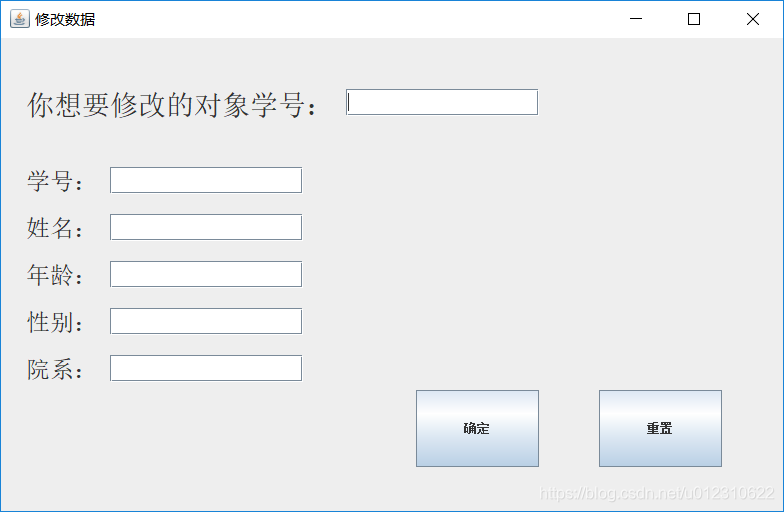
winchange.java
package program9

import java.awt.Dimension
import java.awt.EventQueue

import javax.swing.JFrame
import javax.swing.GroupLayout
import javax.swing.GroupLayout.Alignment
import javax.swing.JLabel
import javax.swing.JOptionPane

import java.awt.Font
import java.awt.Toolkit

import javax.swing.LayoutStyle.ComponentPlacement
import javax.swing.JTextField
import javax.swing.JButton

import java.awt.event.ActionListener
import java.awt.event.ActionEvent


public class winchange {

	private JFrame frame
	private JTextField textField
	private JTextField textField_1
	private JTextField textField_2
	private JTextField textField_3
	private JTextField textField_4
	private JTextField textField_5

	/**
	 * Launch the application.
	 */
	public void Winchange() {
		EventQueue.invokeLater(new Runnable() {
			public void run() {
				try {
					winchange window = new winchange()
					window.frame.setVisible(true)
				} catch (Exception e) {
					e.printStackTrace()
				}
			}
		})
	}

	/**
	 * Create the application.
	 */
	public winchange() {
		initialize()
	}

	/**
	 * Initialize the contents of the frame.
	 */
	private void initialize() {
		frame = new JFrame()
		frame.setTitle("u4FEEu6539u6570u636E")
		frame.setBounds(100, 100, 800, 520)

		int windowWidth = frame.getWidth() //获得窗口宽
		int windowHeight = frame.getHeight() //获得窗口高
		Toolkit kit = Toolkit.getDefaultToolkit() //定义工具包
		Dimension screenSize = kit.getScreenSize() //获取屏幕的尺寸
		int screenWidth = screenSize.width //获取屏幕的宽
		int screenHeight = screenSize.height //获取屏幕的高
		frame.setLocation(screenWidth/2-windowWidth/2, screenHeight/2-windowHeight/2)//设置窗口居中显示

		JLabel label = new JLabel("u4F60u60F3u8981u4FEEu6539u7684u5BF9u8C61u5B66u53F7uFF1A")
		label.setFont(new Font("宋体", Font.PLAIN, 28))

		JLabel label_1 = new JLabel("u5B66u53F7uFF1A")
		label_1.setFont(new Font("宋体", Font.PLAIN, 24))

		JLabel label_2 = new JLabel("u59D3u540DuFF1A")
		label_2.setFont(new Font("宋体", Font.PLAIN, 24))

		JLabel label_3 = new JLabel("u5E74u9F84uFF1A")
		label_3.setFont(new Font("宋体", Font.PLAIN, 24))

		JLabel label_4 = new JLabel("u6027u522BuFF1A")
		label_4.setFont(new Font("宋体", Font.PLAIN, 24))

		JLabel label_5 = new JLabel("u9662u7CFBuFF1A")
		label_5.setFont(new Font("宋体", Font.PLAIN, 24))

		textField = new JTextField()
		textField.setColumns(10)

		textField_1 = new JTextField()
		textField_1.setColumns(10)

		textField_2 = new JTextField()
		textField_2.setColumns(10)

		textField_3 = new JTextField()
		textField_3.setColumns(10)

		textField_4 = new JTextField()
		textField_4.setColumns(10)

		textField_5 = new JTextField()
		textField_5.setColumns(10)

		JButton button = new JButton("u786Eu5B9A")
		button.addActionListener(new ActionListener() {
			public void actionPerformed(ActionEvent e) {
				String S = textField.getText()
				String Num = textField_1.getText()
				String Name = textField_2.getText()
				String Age = textField_3.getText()
				String Sex = textField_4.getText()
				String SelectedIndex = textField_5.getText()
				Change.change(S,Num,Name,Age,Sex,SelectedIndex)
				JOptionPane.showMessageDialog(frame, "修改成功!")

			}
		})

		JButton button_1 = new JButton("u91CDu7F6E")
		button_1.addActionListener(new ActionListener() {
			public void actionPerformed(ActionEvent e) {
				textField.setText("")
				textField_1.setText("")
				textField_2.setText("")
				textField_3.setText("")
				textField_4.setText("")
				textField_5.setText("")
			}
		})
		GroupLayout groupLayout = new GroupLayout(frame.getContentPane())
		groupLayout.setHorizontalGroup(
			groupLayout.createParallelGroup(Alignment.TRAILING)
				.addGroup(Alignment.LEADING, groupLayout.createSequentialGroup()
					.addGap(25)
					.addGroup(groupLayout.createParallelGroup(Alignment.LEADING)
						.addGroup(groupLayout.createSequentialGroup()
							.addGroup(groupLayout.createParallelGroup(Alignment.TRAILING)
								.addComponent(button, GroupLayout.PREFERRED_SIZE, 123, GroupLayout.PREFERRED_SIZE)
								.addGroup(groupLayout.createSequentialGroup()
									.addComponent(label)
									.addPreferredGap(ComponentPlacement.RELATED)
									.addComponent(textField, GroupLayout.PREFERRED_SIZE, 193, GroupLayout.PREFERRED_SIZE)))
							.addPreferredGap(ComponentPlacement.RELATED, 66, Short.MAX_VALUE)
							.addComponent(button_1, GroupLayout.PREFERRED_SIZE, 123, GroupLayout.PREFERRED_SIZE)
							.addGap(61))
						.addGroup(groupLayout.createSequentialGroup()
							.addGroup(groupLayout.createParallelGroup(Alignment.LEADING)
								.addGroup(groupLayout.createSequentialGroup()
									.addComponent(label_5)
									.addPreferredGap(ComponentPlacement.RELATED)
									.addComponent(textField_5, GroupLayout.PREFERRED_SIZE, 193, GroupLayout.PREFERRED_SIZE))
								.addGroup(groupLayout.createSequentialGroup()
									.addComponent(label_4)
									.addPreferredGap(ComponentPlacement.RELATED)
									.addComponent(textField_4, GroupLayout.PREFERRED_SIZE, 193, GroupLayout.PREFERRED_SIZE))
								.addGroup(groupLayout.createSequentialGroup()
									.addComponent(label_3)
									.addPreferredGap(ComponentPlacement.RELATED)
									.addComponent(textField_3, GroupLayout.PREFERRED_SIZE, 193, GroupLayout.PREFERRED_SIZE))
								.addGroup(groupLayout.createSequentialGroup()
									.addComponent(label_2)
									.addPreferredGap(ComponentPlacement.RELATED)
									.addComponent(textField_2, GroupLayout.PREFERRED_SIZE, 193, GroupLayout.PREFERRED_SIZE))
								.addGroup(groupLayout.createSequentialGroup()
									.addComponent(label_1)
									.addPreferredGap(ComponentPlacement.RELATED)
									.addComponent(textField_1, GroupLayout.PREFERRED_SIZE, 193, GroupLayout.PREFERRED_SIZE)))
							.addContainerGap(486, Short.MAX_VALUE))))
		)
		groupLayout.setVerticalGroup(
			groupLayout.createParallelGroup(Alignment.LEADING)
				.addGroup(Alignment.TRAILING, groupLayout.createSequentialGroup()
					.addGap(51)
					.addGroup(groupLayout.createParallelGroup(Alignment.LEADING)
						.addComponent(textField, GroupLayout.PREFERRED_SIZE, 27, GroupLayout.PREFERRED_SIZE)
						.addGroup(groupLayout.createSequentialGroup()
							.addComponent(label)
							.addGap(46)
							.addGroup(groupLayout.createParallelGroup(Alignment.LEADING)
								.addComponent(label_1)
								.addComponent(textField_1, GroupLayout.PREFERRED_SIZE, 27, GroupLayout.PREFERRED_SIZE))
							.addGap(18)
							.addGroup(groupLayout.createParallelGroup(Alignment.LEADING)
								.addComponent(label_2)
								.addComponent(textField_2, GroupLayout.PREFERRED_SIZE, 27, GroupLayout.PREFERRED_SIZE))
							.addGap(18)
							.addGroup(groupLayout.createParallelGroup(Alignment.LEADING)
								.addComponent(label_3)
								.addComponent(textField_3, GroupLayout.PREFERRED_SIZE, 27, GroupLayout.PREFERRED_SIZE))
							.addGap(18)
							.addGroup(groupLayout.createParallelGroup(Alignment.LEADING)
								.addComponent(label_4)
								.addComponent(textField_4, GroupLayout.PREFERRED_SIZE, 27, GroupLayout.PREFERRED_SIZE))
							.addGap(18)
							.addGroup(groupLayout.createParallelGroup(Alignment.LEADING)
								.addComponent(textField_5, GroupLayout.PREFERRED_SIZE, 27, GroupLayout.PREFERRED_SIZE)
								.addComponent(label_5))))
					.addPreferredGap(ComponentPlacement.RELATED, 14, Short.MAX_VALUE)
					.addGroup(groupLayout.createParallelGroup(Alignment.LEADING)
						.addComponent(button_1, GroupLayout.PREFERRED_SIZE, 77, GroupLayout.PREFERRED_SIZE)
						.addComponent(button, GroupLayout.PREFERRED_SIZE, 77, GroupLayout.PREFERRED_SIZE))
					.addGap(44))
		)
		frame.getContentPane().setLayout(groupLayout)
	}

}
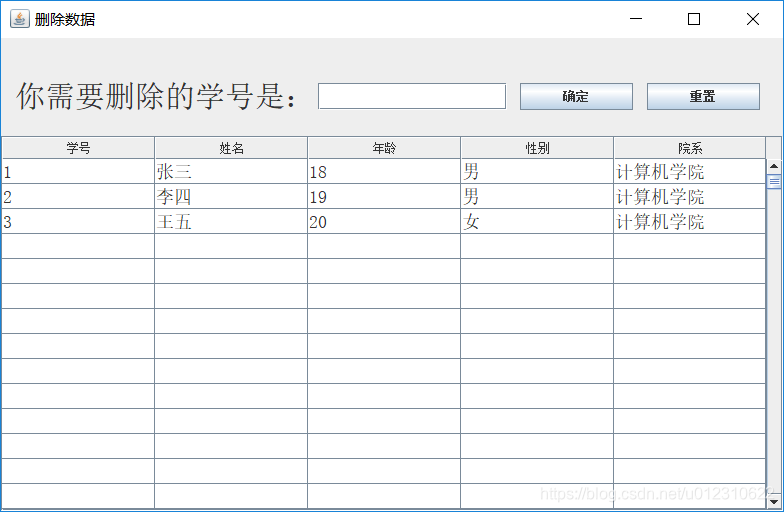
windelete.java
package program9

import java.awt.Dimension
import java.awt.EventQueue
import java.awt.Toolkit

import javax.swing.JFrame
import javax.swing.JLabel
import javax.swing.JOptionPane

import java.awt.Font
import javax.swing.JTextField
import javax.swing.JScrollPane
import javax.swing.JTable
import javax.swing.JButton
import java.awt.event.ActionListener
import java.awt.event.ActionEvent

public class windelete {

	private JFrame frame
	private JTextField textField
	private JTable table

	/**
	 * Launch the application.
	 */
	public void Windelete() {
		EventQueue.invokeLater(new Runnable() {
			public void run() {
				try {
					windelete window = new windelete()
					window.frame.setVisible(true)
				} catch (Exception e) {
					e.printStackTrace()
				}
			}
		})
	}

	/**
	 * Create the application.
	 */
	public windelete() {
		initialize()
	}

	/**
	 * Initialize the contents of the frame.
	 */
	private void initialize() {
		frame = new JFrame()
		frame.setTitle("u5220u9664u6570u636E")
		frame.setBounds(100, 100, 800, 520)

		int windowWidth = frame.getWidth() //获得窗口宽
		int windowHeight = frame.getHeight() //获得窗口高
		Toolkit kit = Toolkit.getDefaultToolkit() //定义工具包
		Dimension screenSize = kit.getScreenSize() //获取屏幕的尺寸
		int screenWidth = screenSize.width //获取屏幕的宽
		int screenHeight = screenSize.height //获取屏幕的高
		frame.setLocation(screenWidth/2-windowWidth/2, screenHeight/2-windowHeight/2)//设置窗口居中显示

		JLabel label = new JLabel("u4F60u9700u8981u5220u9664u7684u5B66u53F7u662FuFF1A")
		label.setBounds(14, 41, 300, 35)
		label.setFont(new Font("宋体", Font.PLAIN, 30))

		textField = new JTextField()
		textField.setBounds(317, 45, 189, 27)
		textField.setColumns(10)
		frame.getContentPane().setLayout(null)
		frame.getContentPane().add(label)
		frame.getContentPane().add(textField)

		JScrollPane scrollPane = new JScrollPane()
		scrollPane.setBounds(0, 98, 782, 375)
		frame.getContentPane().add(scrollPane)

		String[][] data=Show.getRows()
		String[] dataTitle =Show.getHead()
		table = new JTable(data,dataTitle)
		table.setFont(new Font("宋体", Font.PLAIN, 18))
		table.setRowHeight(25)
		scrollPane.setViewportView(table)
		table.setEnabled(false)

		JButton button = new JButton("u786Eu5B9A")
		button.addActionListener(new ActionListener() {
			public void actionPerformed(ActionEvent e) {
				String Num = textField.getText()
				Delete.delete(Num)
				JOptionPane.showMessageDialog(frame, "删除成功!")
				String[][] data=Show.getRows()
				String[] dataTitle =Show.getHead()
				table = new JTable(data,dataTitle)
				table.setFont(new Font("宋体", Font.PLAIN, 18))
				table.setRowHeight(25)
				scrollPane.setViewportView(table)
				table.setEnabled(false)
			}
		})
		button.setBounds(519, 45, 113, 27)
		frame.getContentPane().add(button)

		JButton button_1 = new JButton("u91CDu7F6E")
		button_1.addActionListener(new ActionListener() {
			public void actionPerformed(ActionEvent e) {

			}
		})
		button_1.setBounds(646, 45, 113, 27)
		frame.getContentPane().add(button_1)

	}
}
wininsert.java
package program9

import java.awt.Dimension
import java.awt.EventQueue
import java.awt.Toolkit

import javax.swing.JFrame
import javax.swing.JLabel
import javax.swing.JOptionPane

import java.awt.Font
import javax.swing.JTextField
import javax.swing.JButton
import java.awt.event.ActionListener
import java.awt.event.ActionEvent

public class wininsert {

	private JFrame frame
	private JTextField textField
	private JTextField textField_1
	private JTextField textField_2
	private JTextField textField_3
	private JTextField textField_4

	/**
	 * Launch the application.
	 */
	public void Wininsert() {
		EventQueue.invokeLater(new Runnable() {
			public void run() {
				try {
					wininsert window = new wininsert()
					window.frame.setVisible(true)
				} catch (Exception e) {
					e.printStackTrace()
				}
			}
		})
	}

	/**
	 * Create the application.
	 */
	public wininsert() {
		initialize()
	}

	/**
	 * Initialize the contents of the frame.
	 */
	private void initialize() {
		frame = new JFrame()
		frame.setTitle("u63D2u5165u6570u636E")
		frame.setBounds(100, 100, 800, 520)

		int windowWidth = frame.getWidth() //获得窗口宽
		int windowHeight = frame.getHeight() //获得窗口高
		Toolkit kit = Toolkit.getDefaultToolkit() //定义工具包
		Dimension screenSize = kit.getScreenSize() //获取屏幕的尺寸
		int screenWidth = screenSize.width //获取屏幕的宽
		int screenHeight = screenSize.height //获取屏幕的高
		frame.setLocation(screenWidth/2-windowWidth/2, screenHeight/2-windowHeight/2)//设置窗口居中显示

		JLabel label = new JLabel("u4F60u9700u8981u63D2u5165u7684u6570u636Eu4E3AuFF1A")
		label.setBounds(30, 45, 300, 35)
		label.setFont(new Font("宋体", Font.PLAIN, 30))

		JLabel label_1 = new JLabel("u5B66u53F7uFF1A")
		label_1.setBounds(30, 135, 75, 30)
		label_1.setFont(new Font("宋体", Font.PLAIN, 25))

		JLabel label_2 = new JLabel("u59D3u540DuFF1A")
		label_2.setBounds(30, 190, 75, 30)
		label_2.setFont(new Font("宋体", Font.PLAIN, 25))

		JLabel label_3 = new JLabel("u5E74u9F84uFF1A")
		label_3.setBounds(30, 245, 75, 30)
		label_3.setFont(new Font("宋体", Font.PLAIN, 25))

		JLabel label_4 = new JLabel("u6027u522BuFF1A")
		label_4.setBounds(30, 300, 75, 30)
		label_4.setFont(new Font("宋体", Font.PLAIN, 25))

		JLabel label_5 = new JLabel("u9662u7CFBuFF1A")
		label_5.setBounds(30, 355, 75, 30)
		label_5.setFont(new Font("宋体", Font.PLAIN, 25))
		frame.getContentPane().setLayout(null)
		frame.getContentPane().add(label)
		frame.getContentPane().add(label_1)
		frame.getContentPane().add(label_2)
		frame.getContentPane().add(label_3)
		frame.getContentPane().add(label_4)
		frame.getContentPane().add(label_5)

		textField = new JTextField()
		textField.setBounds(99, 139, 213, 24)
		frame.getContentPane().add(textField)
		textField.setColumns(10)

		textField_1 = new JTextField()
		textField_1.setColumns(10)
		textField_1.setBounds(99, 196, 213, 24)
		frame.getContentPane().add(textField_1)

		textField_2 = new JTextField()
		textField_2.setColumns(10)
		textField_2.setBounds(99, 248, 213, 24)
		frame.getContentPane().add(textField_2)

		textField_3 = new JTextField()
		textField_3.setColumns(10)
		textField_3.setBounds(99, 305, 213, 24)
		frame.getContentPane().add(textField_3)

		textField_4 = new JTextField()
		textField_4.setColumns(10)
		textField_4.setBounds(99, 359, 213, 24)
		frame.getContentPane().add(textField_4)

		JButton button = new JButton("u786Eu5B9A")
		button.addActionListener(new ActionListener() {
			public void actionPerformed(ActionEvent e) {
				String Num = textField.getText()
				String Name = textField_1.getText()
				String Age = textField_2.getText()
				String Sex = textField_3.getText()
				String SelectedIndex = textField_4.getText()
			//	System.out.println(Num+" "+Name+" "+Age+" "+Sex+" "+SelectedIndex+" ");
				Insert.insert(Num,Name,Age,Sex,SelectedIndex)
				JOptionPane.showMessageDialog(frame, "增加成功!")
			}
		})
		button.setBounds(403, 364, 141, 84)
		frame.getContentPane().add(button)

		JButton button_1 = new JButton("u91CDu7F6E")
		button_1.addActionListener(new ActionListener() {
			public void actionPerformed(ActionEvent e) {
				textField.setText("")
				textField_1.setText("")
				textField_2.setText("")
				textField_3.setText("")
				textField_4.setText("")
			}
		})
		button_1.setBounds(599, 364, 141, 84)
		frame.getContentPane().add(button_1)

	}
}
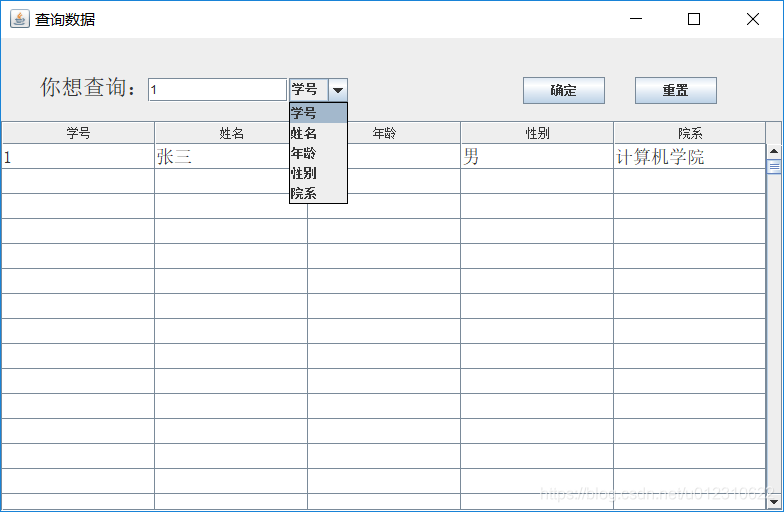
winselect.java
package program9

import java.awt.Dimension
import java.awt.EventQueue
import java.awt.Toolkit

import javax.swing.JFrame
import javax.swing.JLabel
import javax.swing.JOptionPane

import java.awt.Font
import javax.swing.JTextField
import javax.swing.JComboBox
import javax.swing.JButton
import javax.swing.JTable
import java.awt.event.ActionListener
import java.awt.event.ActionEvent
import javax.swing.JScrollPane

public class winselect {

	private JFrame frame
	private JTextField textField_1
	private JTable table

	/**
	 * Launch the application.
	 */
	public void Winselect() {
		EventQueue.invokeLater(new Runnable() {
			public void run() {
				try {
					winselect window = new winselect()
					window.frame.setVisible(true)
				} catch (Exception e) {
					e.printStackTrace()
				}
			}
		})
	}

	/**
	 * Create the application.
	 */
	public winselect() {
		initialize()
	}

	/**
	 * Initialize the contents of the frame.
	 */
	private void initialize() {
		frame = new JFrame()
		frame.setTitle("u67E5u8BE2u6570u636E")
		frame.setBounds(100, 100, 800, 520)

		int windowWidth = frame.getWidth() //获得窗口宽
		int windowHeight = frame.getHeight() //获得窗口高
		Toolkit kit = Toolkit.getDefaultToolkit() //定义工具包
		Dimension screenSize = kit.getScreenSize() //获取屏幕的尺寸
		int screenWidth = screenSize.width //获取屏幕的宽
		int screenHeight = screenSize.height //获取屏幕的高
		frame.setLocation(screenWidth/2-windowWidth/2, screenHeight/2-windowHeight/2)

		JLabel label = new JLabel("u4F60u60F3u67E5u8BE2uFF1A")
		label.setBounds(38, 26, 152, 47)
		label.setFont(new Font("宋体", Font.PLAIN, 22))

		JComboBox<String> comboBox = new JComboBox<String>()
		comboBox.setBounds(288, 40, 59, 24)
		comboBox.addItem("学号")
		comboBox.addItem("姓名")
		comboBox.addItem("年龄")
		comboBox.addItem("性别")
		comboBox.addItem("院系")
		frame.getContentPane().setLayout(null)
		frame.getContentPane().add(label)
		frame.getContentPane().add(comboBox)


		JButton button = new JButton("u786Eu5B9A")
		button.addActionListener(new ActionListener() {
			public void actionPerformed(ActionEvent e) {
				JOptionPane.showMessageDialog(frame, "查询成功!")
			}
		})
		button.setBounds(522, 39, 82, 27)
		frame.getContentPane().add(button)

		JButton button_1 = new JButton("u91CDu7F6E")
		button_1.addActionListener(new ActionListener() {
			public void actionPerformed(ActionEvent e) {
				textField_1.setText("")
			}
		})

		button_1.setBounds(634, 39, 82, 27)
		frame.getContentPane().add(button_1)

		textField_1 = new JTextField()
		textField_1.setBounds(147, 40, 140, 24)
		frame.getContentPane().add(textField_1)
		textField_1.setColumns(10)

		JScrollPane scrollPane = new JScrollPane()
		scrollPane.setBounds(0, 83, 782, 390)
		frame.getContentPane().add(scrollPane)


		button.addActionListener(new ActionListener()
		{
			public void actionPerformed(ActionEvent e)
			{
				String content = textField_1.getText()
				String[] dataTitle =Select.getHead()
				if(comboBox.getSelectedIndex() == 0)
				{
				//	System.out.println(content);
					String[][] data=Select.getnumber(content)
					table = new JTable(data,dataTitle)
					table.setFont(new Font("宋体", Font.PLAIN, 18))
					table.setRowHeight(25)
					scrollPane.setViewportView(table)
					table.setEnabled(false)
				}
				else if(comboBox.getSelectedIndex() == 1)
				{
				//	System.out.println(content);
					String[][] data=Select.getname(content)
					table = new JTable(data,dataTitle)
					table.setFont(new Font("宋体", Font.PLAIN, 18))
					table.setRowHeight(25)
					scrollPane.setViewportView(table)
					table.setEnabled(false)
				}
				else if(comboBox.getSelectedIndex() == 2)
				{
				//	System.out.println(content);
					String[][] data=Select.getage(content)
					table = new JTable(data,dataTitle)
					table.setFont(new Font("宋体", Font.PLAIN, 18))
					table.setRowHeight(25)
					scrollPane.setViewportView(table)
					table.setEnabled(false)
				}
				else if(comboBox.getSelectedIndex() == 3)
				{
				//	System.out.println(content);
					String[][] data=Select.getsex(content)
					table = new JTable(data,dataTitle)
					table.setFont(new Font("宋体", Font.PLAIN, 18))
					table.setRowHeight(25)
					scrollPane.setViewportView(table)
					table.setEnabled(false)
				}
				else if(comboBox.getSelectedIndex() == 4)
				{
				//	System.out.println(content);
					String[][] data=Select.getdepartments(content)
					table = new JTable(data,dataTitle)
					table.setFont(new Font("宋体", Font.PLAIN, 18))
					table.setRowHeight(25)
					scrollPane.setViewportView(table)
					table.setEnabled(false)
				}
			}
		})

	}
}
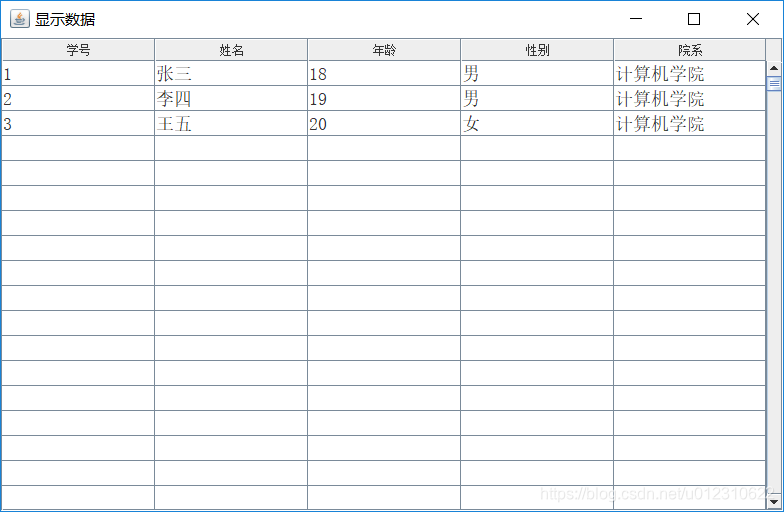
winshow.java
package program9

import java.awt.Dimension
import java.awt.EventQueue
import java.awt.Toolkit

import javax.swing.JFrame
import javax.swing.JScrollPane
import javax.swing.JTable
import java.awt.Font
import javax.swing.GroupLayout
import javax.swing.GroupLayout.Alignment

public class winshow {

	private JFrame frame
	private JTable table_1

	/**
	 * Launch the application.
	 */
	public  void Winshow() {
		EventQueue.invokeLater(new Runnable() {
			public void run() {
				try {
					winshow window = new winshow()
					window.frame.setVisible(true)
				} catch (Exception e) {
					e.printStackTrace()
				}
			}
		})

	}

	/**
	 * Create the application.
	 */
	public winshow() {
		initialize()
	}

	/**
	 * Initialize the contents of the frame.
	 */
	private void initialize() {
		frame = new JFrame()
		frame.setTitle("u663Eu793Au6570u636E")
		frame.setBounds(100, 100, 800, 520)

		int windowWidth = frame.getWidth() //获得窗口宽
		int windowHeight = frame.getHeight() //获得窗口高
		Toolkit kit = Toolkit.getDefaultToolkit() //定义工具包
		Dimension screenSize = kit.getScreenSize() //获取屏幕的尺寸
		int screenWidth = screenSize.width //获取屏幕的宽
		int screenHeight = screenSize.height //获取屏幕的高
		frame.setLocation(screenWidth/2-windowWidth/2, screenHeight/2-windowHeight/2)//设置窗口居中显示

		JScrollPane scrollPane = new JScrollPane()


		String[][] data=Show.getRows()
		String[] dataTitle =Show.getHead()
		table_1 = new JTable(data,dataTitle)
		table_1.setFont(new Font("宋体", Font.PLAIN, 18))
		table_1.setRowHeight(25)
		scrollPane.setViewportView(table_1)
		table_1.setEnabled(false)
		GroupLayout groupLayout = new GroupLayout(frame.getContentPane())
		groupLayout.setHorizontalGroup(
			groupLayout.createParallelGroup(Alignment.LEADING)
				.addComponent(scrollPane, GroupLayout.PREFERRED_SIZE, 782, GroupLayout.PREFERRED_SIZE)
		)
		groupLayout.setVerticalGroup(
			groupLayout.createParallelGroup(Alignment.LEADING)
				.addComponent(scrollPane, GroupLayout.PREFERRED_SIZE, 473, GroupLayout.PREFERRED_SIZE)
		)
		frame.getContentPane().setLayout(groupLayout)


	}

}
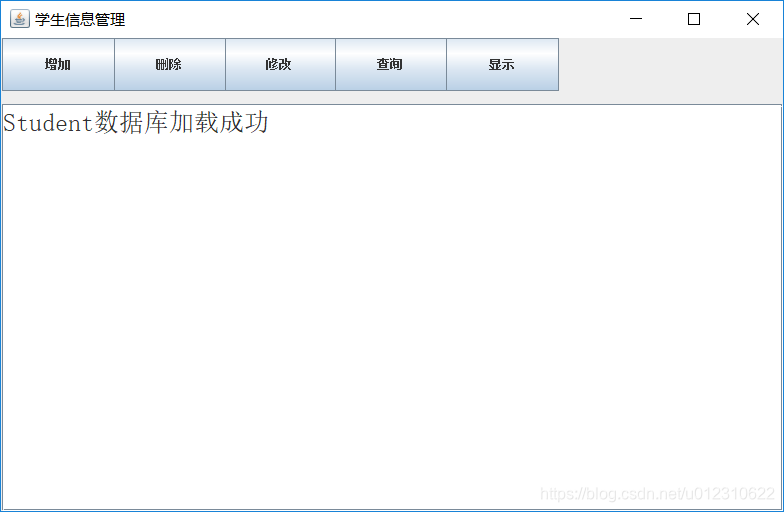
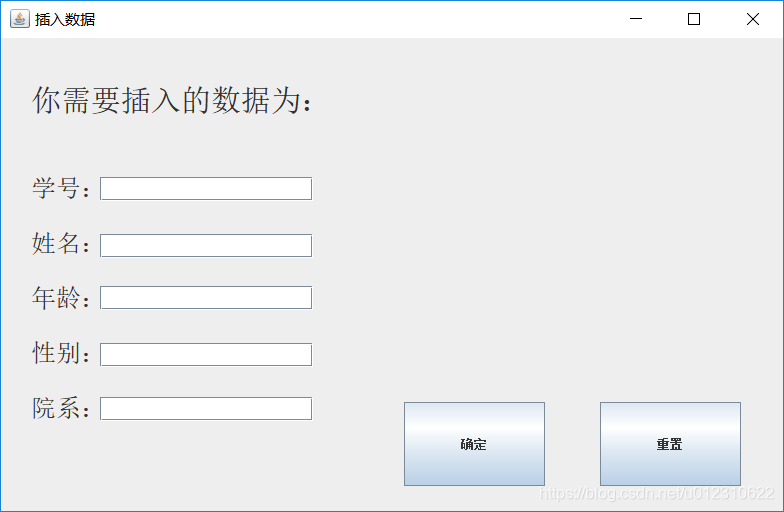
附赠效果图

Comments NOTHING